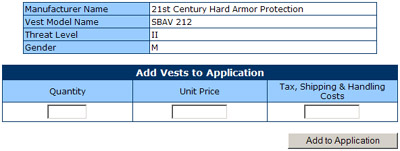
In this screen "Add NIJ-Approved Vest to BVP Application",
you will find a breakdown of your selected vest's details (Manufacturer
Name, Vest Model Name, Threat Level and Gender) listed at the top.
To add a model to the application, you must complete "Quantity"
, "Unit Price" (the price you expect to pay per vest), and "Tax,
Shipping & Handling Charges" (for delivery of complete order,
if the vendor will not be adding these charges, include $ 0.00 in this
area) and then click on the button "Add to Application". If
you will have multiple vest styles on an application, it will be necessary
to select section 3.1 "Add Vests to Application" on the left-hand
menu, when you want, add the next style to the application.
|