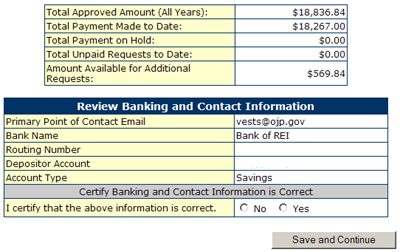
The Request Payment Form now appears on your screen. At the bottom of this
form is the Banking information. The program is asking the applicant to
Review Banking and Contact Information to verify that the funds will be
deposited into the correct account and the proper bank. If this information
is correct, proceed to the bottom portion of the form.
If the Banking and Contact Information is correct, select the "Yes"
choice and click on the "Continue" button. If the banking information
is not correct, go back to section 1.2 "Update Registration",
review the Banking Information, make corrections, go to section 1.3 "Print
Banking Form", print out a new Bank Form, have it verified by your
bank and mail it to REI Systems, Inc.
|